Beyond Actions: How Photoshop Automation Scripts Actually Work (And Why I Use Both)

Beyond Actions: How Photoshop Automation Scripts Actually Work (And Why I Use Both)

I learned to write scripts the hard way. A client sent over 200 product images that all needed the same crop, the same canvas size, the same file naming convention. I spent the entire first day doing it by hand. Somewhere around image 140, I made a crop error and had to go back. That evening I opened a JavaScript reference guide and didn’t go to bed until I had something that worked.

Where AI Fits Into Your Creative Workflow (And Where It Doesn't)

Where AI Fits Into Your Creative Workflow (And Where It Doesn't)

The Tool Question We Keep Getting Wrong There’s been a lot of hand-wringing lately about artificial intelligence in creative work. I get it—there’s legitimate philosophical territory here about authorship and craft. But I’ve noticed we’re often framing this as a binary choice when the reality is much more nuanced, especially when you’re thinking about your actual day-to-day editing workflow. Let me be direct: I use AI tools. Not because I’m trying to skip the hard parts of being a photographer or designer, but because I’m pragmatic about what saves me time on repetitive tasks.

Blending Photos and Graphics in Photoshop: What Aaron Nace's Workflow Taught Me About Working Smarter

Blending Photos and Graphics in Photoshop: What Aaron Nace's Workflow Taught Me About Working Smarter

Client work has a way of pushing you into techniques you’d never have explored on your own. Ad agencies started asking me for portraits with a graphic, illustrated feel about two years ago, and I spent an embarrassing amount of time cobbling together workflows from scattered forum posts. So when PHLEARN released their Graphic Portrait Pro tutorial, hosted by Aaron Nace, I watched the whole thing twice before breakfast. Not because the concepts were brand new to me, but because seeing six complete workflows in one place, with all the source files included, is the kind of resource that would have saved me weeks of trial and error.

How I Built a Batch Automation System That Processed 500 Product Shots in One Afternoon

How I Built a Batch Automation System That Processed 500 Product Shots in One Afternoon

The job came in on a Thursday. Five hundred product images, all needing the same treatment: background removal, shadow drop, color correction to a specific brand profile, resize to 2000x2000 at 72dpi, and export as sRGB JPEGs under 500KB each. The client needed them by Monday morning. A few years ago, that would have meant a miserable weekend. Instead, I had them done by 4pm Friday and spent the rest of the afternoon with my kids.

Mastering Export Workflows: How to Package Your Photoshop Actions Like a Pro

Mastering Export Workflows: How to Package Your Photoshop Actions Like a Pro

Mastering Export Workflows: How to Package Your Photoshop Actions Like a Pro I’ve spent more hours than I’d like to admit troubleshooting broken action files and corrupted preset exports. But here’s what I’ve learned: most export problems aren’t mysteries—they’re just preventable mistakes. Let me walk you through the exact workflow I use to export actions and presets that reliably work across different machines. Understanding Photoshop’s Export Limitations Before you export anything, you need to know what Photoshop actually supports.

The Best Workflow Tools to Supercharge Your Photoshop Actions

The Best Workflow Tools to Supercharge Your Photoshop Actions

The Best Workflow Tools to Supercharge Your Photoshop Actions I’ve spent years building Photoshop actions and presets, and I’ve learned something crucial: Photoshop alone isn’t enough. The real magic happens when you layer complementary tools around your actions to create a seamless editing pipeline. Let me share the tools that have genuinely transformed how I work, and more importantly, how you can use them without getting overwhelmed. Why Tool Stacking Actually Matters Before I jump into specific recommendations, I want to be honest about something: adding more tools doesn’t automatically make you faster.

The Best Workflow Tools That Changed How I Build Photoshop Actions

The Best Workflow Tools That Changed How I Build Photoshop Actions

I’ve spent the last five years building Photoshop actions for designers, and I can tell you honestly: the right tools don’t just save time—they fundamentally change what’s possible in your workflow. I’m talking about going from manually recording actions to architecting complex, intelligent workflows that handle edge cases and variations automatically. Why Generic Tools Aren’t Enough When I started, I tried using only Photoshop’s native action recorder. It works fine for simple tasks—apply a filter, resize, export.

Streamlining Your Creative Workflow: Lessons from Game Development's Biggest Releases

Streamlining Your Creative Workflow: Lessons from Game Development's Biggest Releases

Why Game Development Teaches Us About Workflow Efficiency I’ve been thinking a lot lately about how professional creative teams handle massive projects under tight deadlines. When I heard that a major roguelite action RPG is expanding to multiple platforms simultaneously this April, it got me wondering: what can photographers and digital artists learn from how game studios orchestrate these complex launches? The answer is more relevant than you’d think. Whether you’re shipping a game across five different platforms or processing hundreds of client photos, the underlying principle is identical—systematic workflow optimization saves time and prevents errors.

Photoshop Actions: The Workflow Game-Changer I Wish I'd Discovered Earlier

Photoshop Actions: The Workflow Game-Changer I Wish I'd Discovered Earlier

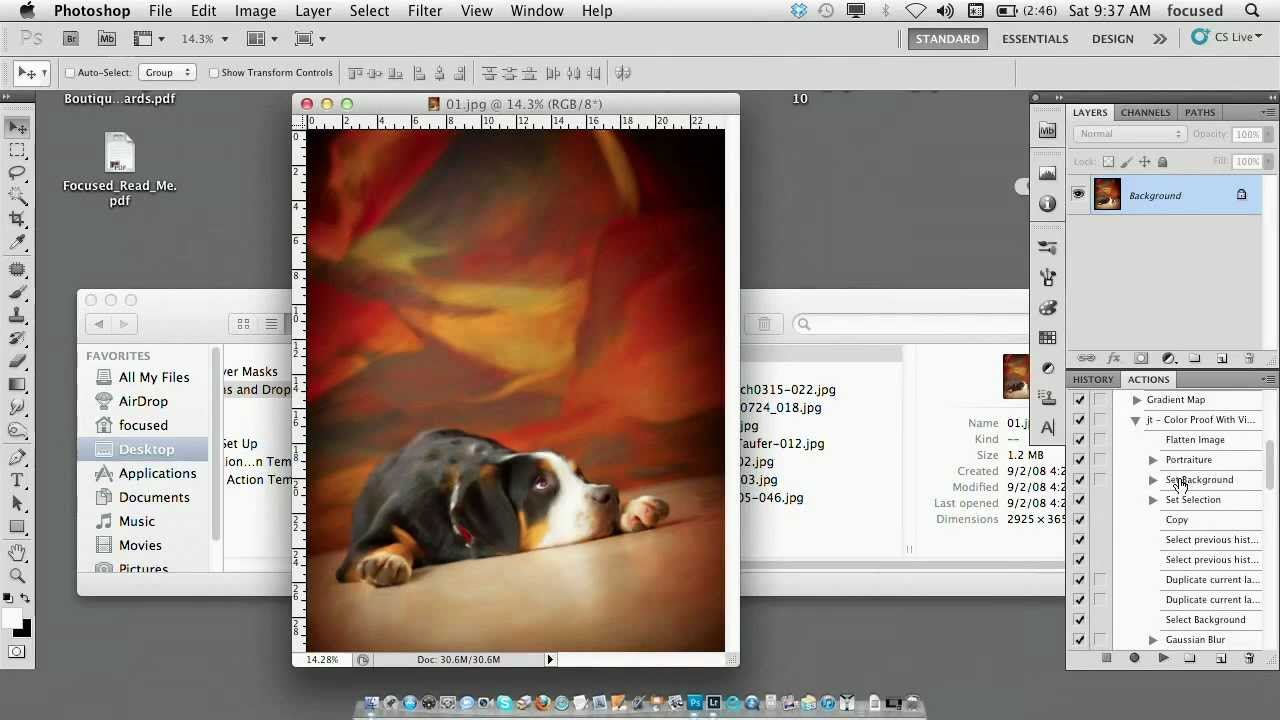
Photoshop Actions: The Workflow Game-Changer I Wish I’d Discovered Earlier I spent three years doing the same thing every single day: open an image, resize it to 1200x800, add a subtle vignette, boost saturation by 12%, and export as JPEG. Three years of mindless clicking. Then I discovered Photoshop actions, and honestly, I felt a bit foolish for not exploring them sooner. If you’re not using actions yet, you’re leaving serious productivity on the table.

Photoshop Actions: The Game-Changer Your Workflow Needs (If You Use Them Right)

Photoshop Actions: The Game-Changer Your Workflow Needs (If You Use Them Right)

Photoshop Actions: The Game-Changer Your Workflow Needs (If You Use Them Right) I used to spend roughly 12 hours a week on repetitive Photoshop tasks. Resizing batches of product photos. Applying the same color correction to 50 real estate listings. Adding watermarks to portfolio images. Then I actually sat down and built a proper action library, and I genuinely can’t overstate the impact—those 12 hours became maybe 2. The catch? Most people don’t use Photoshop actions effectively.

Photoshop Actions: Building Your First Automation That Actually Saves Time

Photoshop Actions: Building Your First Automation That Actually Saves Time

I’ve watched countless designers create their first Photoshop action with unrealistic expectations. They think they’ll automate everything in five minutes and reclaim hours of their life. Then reality hits—the action breaks on the second image, or it works perfectly on their machine but fails for their team. After building hundreds of actions across different projects, I’ve learned what separates functional automations from genuinely useful ones. Let me share what actually works.

Photoshop Actions: Building Your First Automation Library

Photoshop Actions: Building Your First Automation Library

Photoshop Actions: Building Your First Automation Library I’ve watched countless photographers and designers download massive action packs, use them once, then abandon them because they don’t fit their actual workflow. The problem isn’t the actions themselves—it’s that most people approach automation backward. They try to fit their work into pre-built tools instead of building tools around their work. Let me show you how to do this right. Why Most Actions Fail (And How to Avoid It) Here’s the honest truth: generic action packs fail because they make assumptions about your setup.