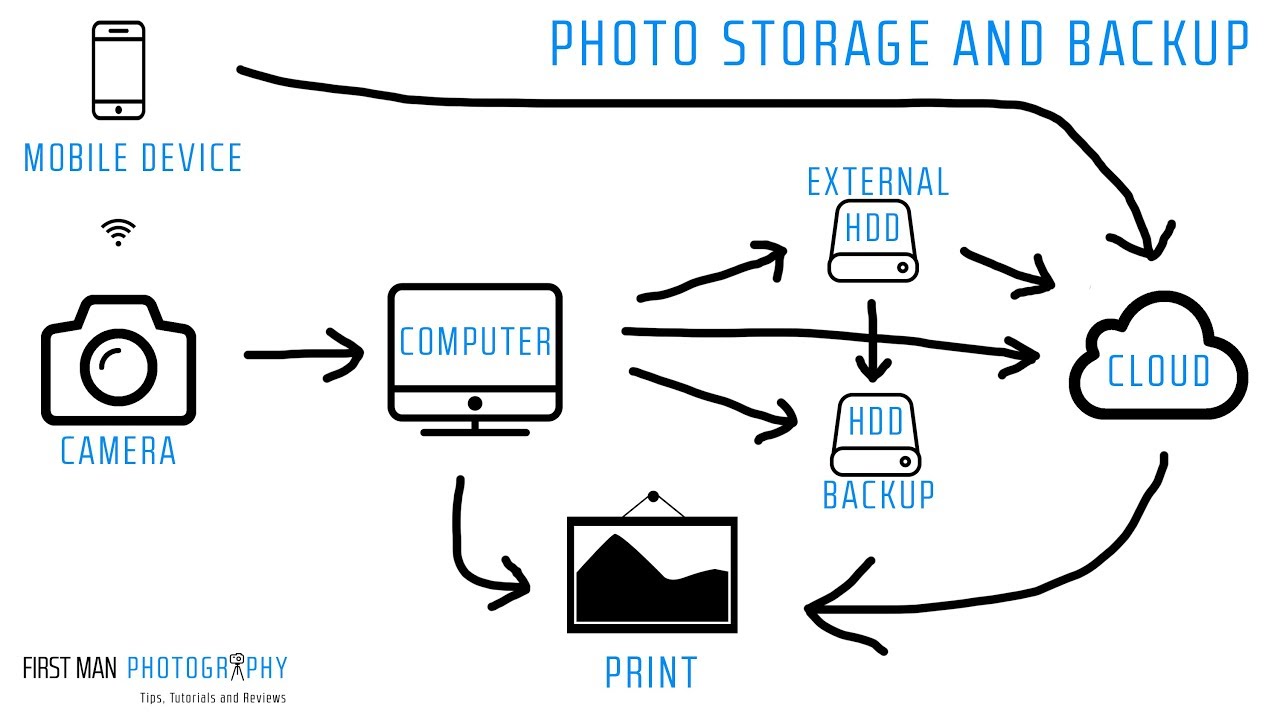
The 3-2-1 Backup Reality Check: How I Finally Stopped Being One Hard Drive Failure Away From Disaster

The 3-2-1 Backup Reality Check: How I Finally Stopped Being One Hard Drive Failure Away From Disaster

I have backup drives for my backup drives. That’s not a joke. After 15 years in commercial photography studios and now running my own post-production consultancy, I’ve watched enough drives fail, cards corrupt, and laptops get stolen that redundancy is basically a personality trait at this point. So when I say the topic of photo and video backup genuinely keeps me up at night, I mean it. Even with all my systems in place, I still catch myself getting lazy when a deadline is looming and the “I’ll back that up later” voice gets louder than it should.

The Field Backup Workflow That Saved My Footage (And Will Save Yours)

The Field Backup Workflow That Saved My Footage (And Will Save Yours)

I have backup drives for my backup drives. My kids think this is insane. My clients think it’s why they keep hiring me. After fifteen years in commercial photography, I’ve learned that the photographers who stay in business aren’t always the most talented ones. They’re the ones who never show up to a client meeting and say “I lost the files.” That conversation ends careers. So when I came across Watch the full tutorial on YouTube from Pierre T.

Mastering Export Workflows: How to Share Your Photoshop Actions Without Losing Your Mind

Mastering Export Workflows: How to Share Your Photoshop Actions Without Losing Your Mind

Mastering Export Workflows: How to Share Your Photoshop Actions Without Losing Your Mind I’ve spent way too many hours troubleshooting corrupted action files and presets that refuse to load on someone else’s system. But I’ve finally cracked the code on reliable exports, and I’m genuinely excited to walk you through it. Why Standard Exports Fail (And How to Fix It) Here’s the thing: exporting actions from Photoshop’s default “Save Actions” dialog looks simple, but it’s deceptively fragile.

Mastering Export Workflows: How to Save Your Photoshop Actions Properly

Mastering Export Workflows: How to Save Your Photoshop Actions Properly

I’ve watched too many creators struggle with broken action files. Someone exports an action, shares it, and suddenly it won’t load on another machine. The preset icons disappear. The color values get corrupted. These problems aren’t random—they come from exporting the wrong way. After years of building and distributing actions, I’ve learned exactly what works and what doesn’t. Let me walk you through it. Why Export Matters More Than You Think Here’s the thing: exporting an action isn’t just about sharing.

Mastering Export Workflows: How to Save and Share Your Photoshop Actions Like a Pro

Mastering Export Workflows: How to Save and Share Your Photoshop Actions Like a Pro

Mastering Export Workflows: How to Save and Share Your Photoshop Actions Like a Pro I’ve spent countless hours building Photoshop actions, only to lose them during a software update or accidentally delete a folder I’d forgotten about. That’s when I realized: exporting and organizing your workflows isn’t optional—it’s essential. Whether you’re backing up your personal collection or sharing actions with clients and colleagues, understanding export workflows will save you time and frustration.